Investment Platforms: Pick One Built for Options Speed
Featured image: Investment Platforms: Pick One Built for Options Speed
Most “investment platforms” are built for long-term portfolios: buy, hold, rebalance, repeat. That works fine until you trade options actively, especially if you scalp, day trade, or manage multi-leg positions intraday. In those styles, speed is not a vanity metric, it is risk control. If your platform slows you down, you do not just miss entries, you miss exits, you get worse fills, and you spend mental bandwidth fighting the interface instead of the market.
For fast options trading, the right choice is rarely “the platform with the most features.” It is the platform that reduces friction between seeing an opportunity and getting a clean order to market.
Why options traders should judge investment platforms differently
Options are uniquely sensitive to time and micro-moves in the underlying.
- Wide and moving spreads: Many contracts are less liquid than the underlying stock or ETF, and quotes can move or disappear quickly.
- Nonlinear risk (Greeks): Delta shifts, gamma can accelerate, and implied volatility can change fast around events.
- Time decay is constant: Even if it is not the dominant driver minute-to-minute, it is always part of the backdrop.
In practice, “platform speed” shows up as:
- You see the quote, click, and the market is already different.
- You hesitate to adjust a spread because the order workflow is too slow.
- You skip protective orders because setting TP/SL takes too many steps.
If you are trading actively, your platform is part of your execution edge (or your execution drag).
What “speed” actually means in an options trading platform
Many traders think speed is only about broker routing or exchange latency. That matters, but most real-world delays happen earlier: in the UI, the workflow, and the time it takes to build and manage orders correctly.
A useful way to think about speed is end-to-end latency: from market update to decision to order entry to broker acknowledgement.
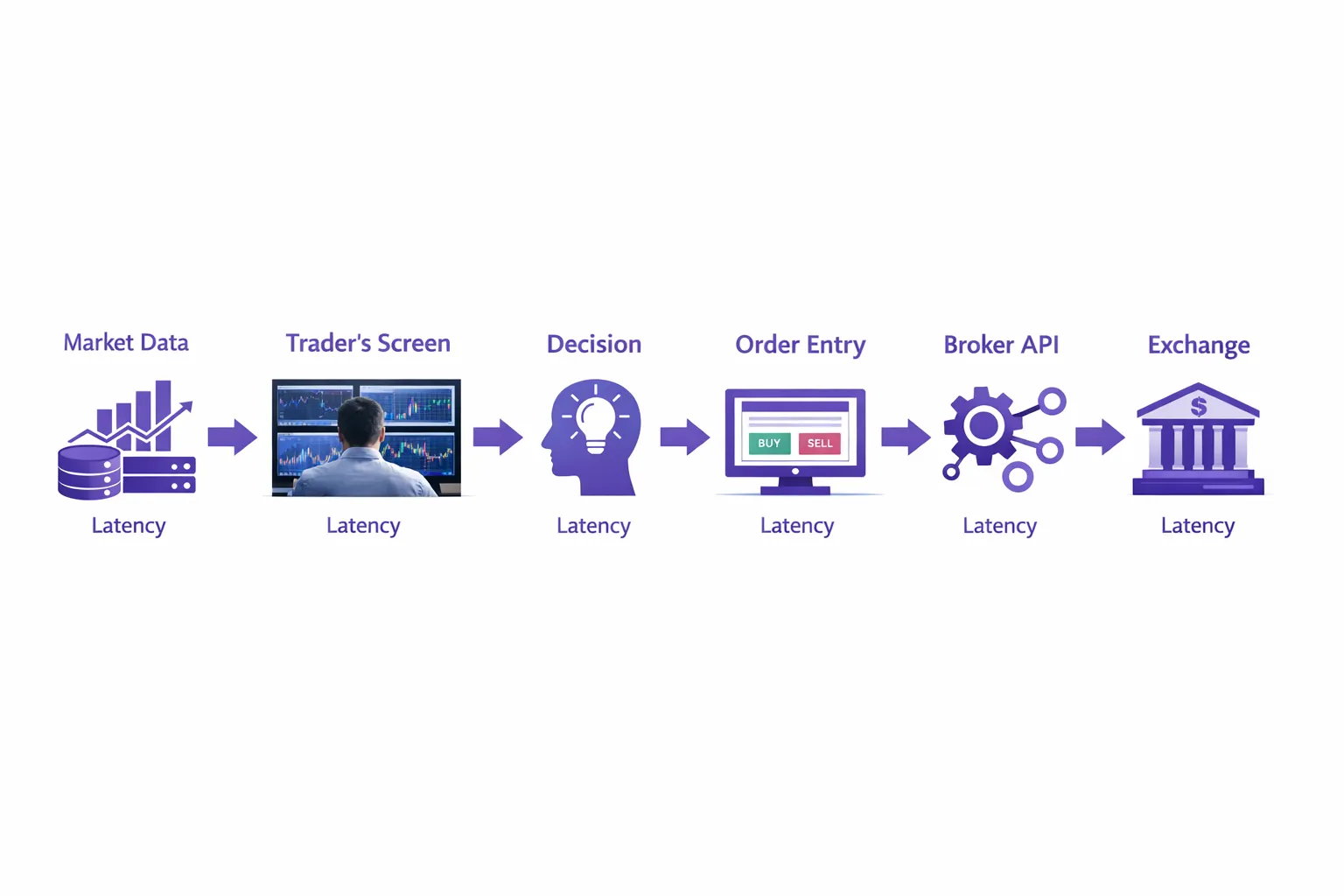
Here is a practical breakdown you can use to evaluate any investment platform designed for options trading.
| Speed layer | What it affects | What “slow” feels like | What to look for |
|---|---|---|---|
| Market data to screen | Seeing changes in quotes, spreads, and greeks | Quotes feel stale, chain updates lag, flickering freezes | Consistent real-time updates, stable under load, fast chain rendering |
| Decision workflow (UI friction) | How fast you can find the right contract and act | Too many clicks, too many dialogs, constant scrolling | Fast search, scannable chains, multi-chain options view, hotkeys or efficient one-click actions |
| Order construction | Building single-leg and multi-leg orders accurately | Legs get mixed up, spreads are hard to verify, costs unclear | Clear strike visualization, spread cost highlighting, easy quantity changes |
| Order submission and modification | Getting orders to the broker and adjusting quickly | “Submitting…” delays, slow cancel/replace, lost time on fast moves | Low overhead order handling, reliable cancel/replace behavior |
| Risk automation | Setting protection and exits without slowing down | You skip TP/SL because it is tedious | Automated TP/SL for options with simple setup and clear monitoring |
For active traders, the two biggest platform wins are usually:
- Reducing UI friction (time-to-order)
- Reducing “risk-management friction” (time-to-protection)
The hidden cost of a slow platform: worse execution and inconsistent behavior
Slippage is not just about market orders. A slow platform can worsen execution even when you use limit orders because you:
- enter stale limits,
- miss the window for a fill,
- or fail to adjust quickly when the market shifts.
Regulators and industry bodies consistently emphasize that options carry distinct risks and complexities (including liquidity and pricing behavior). If you want a refresher on the official risks and characteristics, see the SEC’s Options Disclosure Document.
The takeaway is simple: in options, speed is part of “doing the basics well.”
A practical map of investment platforms (and where they break for active options)
Not all investment platforms are trying to solve the same job. If your job is “build long-term wealth,” you can tolerate more friction. If your job is “execute and manage options positions intraday,” you need a platform that behaves like professional options trading software.
| Platform category | Best for | Typical strengths | Typical weaknesses for fast options trading |
|---|---|---|---|
| Mobile-first investing apps | Casual investing, occasional options | Simple UI, easy onboarding | Limited chains, slower workflows, weak multi-leg clarity, less control for rapid adjustments |
| Web-based broker platforms | General trading, light derivatives | Accessibility, no install | Browser overhead, slower chain interaction, heavier click paths |
| Broker desktop terminals | Active trading across asset classes | Deep feature set, data and routing integration | Feature bloat, complex dialogs, slower “time-to-order,” cluttered chain views |
| API-first workflows | Systematic strategies, custom tools | Maximum control for coders | Engineering burden, harder discretionary flow, risk tools require building |
| Options-focused desktop software | Discretionary options traders | Optimized chains, fast order workflows, clearer spreads | Usually narrower scope, often tied to specific brokers |
If your headline requirement is options trading with low latency, the last category is where you should spend your time.
What to prioritize when you want fast options trading (without sacrificing control)
Many platforms advertise “advanced options.” That usually means more analytics. For scalpers and day traders, the more important question is: How fast can I do the next correct action?
1) Multi-chain viewing for faster selection and comparison
Single-chain views force you into a scroll-and-switch loop. That loop is a tax on every trade.
A multi-chain options view matters because it helps you:
- compare strikes and expirations at once,
- react to volatility shifts without losing context,
- and manage multiple positions without constantly reloading the chain.
This is especially valuable when you are trading around the open, news, or high-volume expirations.
2) Order entry that matches how you actually trade options
Fast options trading is not “click faster.” It is “click fewer times.”
A good options trading platform should make it natural to:
- toggle between mid, bid/ask, and marketable limit logic when appropriate,
- adjust size quickly,
- and verify spread cost and structure at a glance.
If you want a deeper execution-focused discussion, NeonChainX has a practical guide on market order vs limit for options that frames when speed should win and when price control should win.
3) Automation for TP/SL that is actually usable mid-trade
Plenty of platforms can place exits. The problem is that many make it a multi-step process, which is why traders delay it.
For active traders, the best risk automation is:
- fast to set,
- easy to audit,
- and easy to change.
NeonChainX supports one-click automation for TP/SL, with rules you can monitor and manage directly. If you want the mechanics, see the guide to Take Profit and Stop Loss configuration in NeonChainX.
4) Real-time position awareness without spreadsheet brain
If you have to “calculate in your head” because the platform is unclear, you will trade slower.
For fast decision cycles, prioritize:
- real-time options P&L tracking per position,
- clear display of open positions next to the chain,
- and fast recognition of what changed (price, size, fill status).
5) Stability under load (the most underrated speed feature)
A platform that is fast on a quiet afternoon but sluggish during the open is not fast in the only moments that matter.
When you evaluate options trading tools, test performance when:
- many contracts are updating,
- you are flipping between expirations,
- and you are modifying orders quickly.
How to test an investment platform for options speed (a simple evaluation routine)
You do not need a lab. You need a repeatable routine and honest notes.
Run a “time-to-action” test
Pick a liquid underlying you trade often and define a basic workflow, for example: pick an expiration, choose a strike, open a spread, set a take profit, set a stop loss.
Measure (informally is fine) how long it takes to do each action and where you hesitate.
Run a “fast modify” test
Active options trading is rarely one-and-done. Your platform should support quick adjustments.
Try:
- cancel and replace on a limit order during a moving market,
- reducing size after partial fills,
- and adjusting exits after entry.
If these actions feel clumsy, your platform is taxing your execution.
Run a “chain clarity” test
Options chains can become visual noise. A platform built for professionals makes the important info obvious.
Ask:
- Can I instantly see spread cost and structure?
- Can I compare multiple expirations without losing my place?
- Do I trust what I am seeing, or am I constantly double-checking?
Run a “recovery” test
Disconnects happen: Wi‑Fi blips, laptop sleeps, broker sessions reset.
A professional options trading platform should reconnect cleanly and restore your working context without drama.
For IBKR users, make sure you test both TWS and IB Gateway connectivity patterns. NeonChainX’s Getting Started guide includes the practical setup details that matter for real trading, not just a demo.
Interactive Brokers users: why the platform choice matters even more
Interactive Brokers (IBKR) is popular with active traders because it offers broad market access and robust infrastructure. But IBKR users often run into a common reality:
- IBKR can be strong as a broker while your day-to-day speed depends on the front end.
That is why many traders separate “broker choice” from “platform choice.” You want a front end that is:
- options-first (not a general trading terminal),
- fast to navigate and execute,
- and directly integrated (no extra hops).
If you are trying to evaluate speed systematically, NeonChainX’s guide on trading execution and cutting latency is a good companion because it breaks latency into decision, platform, and network components.
Where NeonChainX fits: a fast options trading platform for Interactive Brokers
NeonChainX is built specifically for traders who already use Interactive Brokers and want fast options trading software that removes workflow drag.
What makes it relevant for “investment platforms” shoppers who trade options actively:
- Speed and low latency trading focus: NeonChainX is designed to add less than 10ms latency, so the platform itself is not the bottleneck.
- Direct IBKR integration: Works with TWS or IB Gateway, avoiding third-party intermediaries.
- Options-first design: It is not a general investing app. It is purpose-built options trading software.
- Multi-chain options view: See multiple strikes and expirations in one clean interface, so you spend less time switching and scrolling.
- One-click TP/SL automation: Add protective exits quickly, which is critical for day trading and scalping.
- Visual clarity for spreads: Spread costs are highlighted and strikes are easy to interpret.
- Real-time options P&L tracking: Stay aware of position performance while markets move.
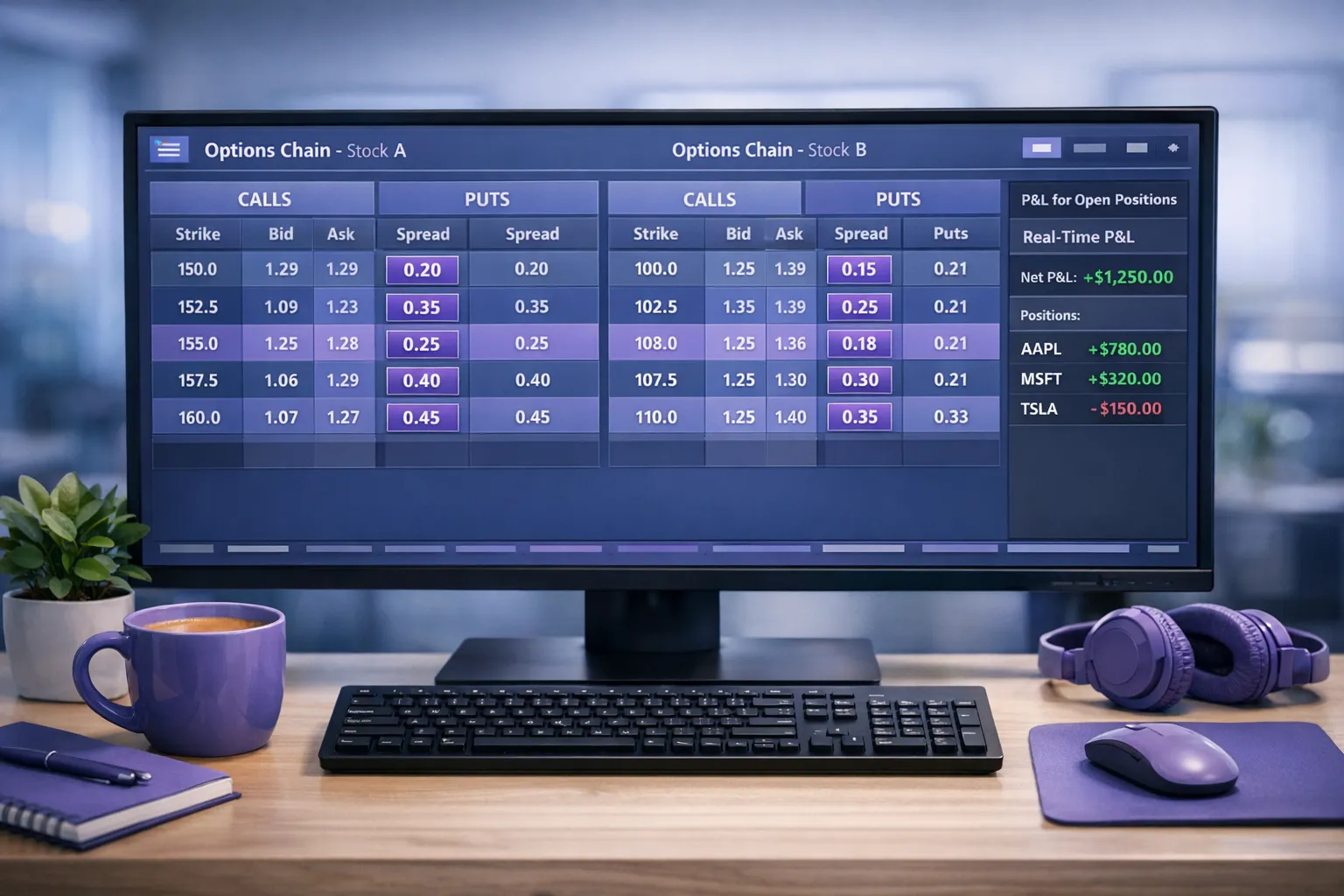
If you want to understand the broader evaluation criteria first, NeonChainX also has a platform-agnostic checklist in Low latency broker: what to look for. And if your decisions depend heavily on costs, the breakdown of Interactive Brokers brokerage fees helps you separate commissions from execution-related “hidden costs.”
The decision rule: match the platform to your trading tempo
If you place a few options trades per month, almost any investment platform can work.
If you trade options actively (day trading, scalping, frequent spread management), your platform should be treated like core infrastructure. Prioritize:
- low-friction chain navigation,
- fast order construction and modification,
- low latency options execution,
- and automation that makes risk management easy to do consistently.
NeonChainX is designed for exactly that profile: professional options trading tools for IBKR traders who care about speed and clarity.
To evaluate it in your own workflow, start with the NeonChainX setup guide, connect to TWS or IB Gateway, and run the same time-to-action tests you would apply to any options trading platform.